
Fast tray-first workflow
Open the app from the tray, send files quickly, and keep the window pinned open while you add more content.
MatrixIT Secure Share
Secure Share is a self-contained Windows application that lets users upload files and folders, create protected share links, and manage secure sends directly from the desktop. It talks straight to Nextcloud and stores credentials encrypted on-device.
Why It Sells
Secure Share is designed for organizations that want a clean Windows delivery model, stronger privacy, and a better end-user experience than browser add-ins routed through localhost.
Open the app from the tray, send files quickly, and keep the window pinned open while you add more content.
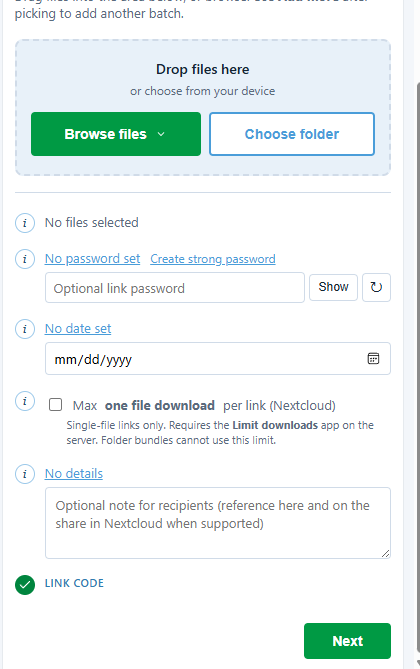
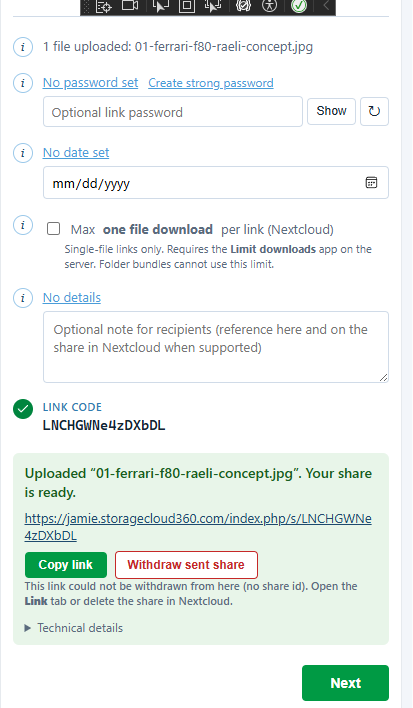
Upload single files or full folders, then generate a public Nextcloud share link from the same desktop flow.
Create stronger protected links with optional password generation, expiry date selection, and one-time download behavior.
Uses native pickers, tray interactions, a single-instance desktop host, and a self-contained executable for broad deployment.
Uploads are handled in the native host rather than fragile browser interception, improving reliability and future readiness for larger files.
No intermediate Node proxy. The desktop app performs the authenticated WebDAV and OCS calls directly.
Guides
The website includes dedicated guides for day-to-day users and for administrators rolling out Secure Share with Nextcloud server configuration in mind.
Covers first-time setup, sending files and folders, advanced share options, request-upload workflows, and troubleshooting.
Covers Windows deployment, post-install validation, Nextcloud server best practices, folder structure, share-model guidance, and verification steps.
Private By Design
Secure Share was designed to reduce moving parts. No localhost listener, no Docker stack, no separate web proxy. The desktop app stores credentials locally with Windows encryption and sends files directly to Nextcloud.
Real App Screens
These are real views from the Windows application: selection, configuration, and successful share creation.

Credentials are stored locally and encrypted for the current Windows user. The desktop host handles uploads directly to Nextcloud, with no localhost service and no Docker dependency in the user workflow.
How It Works
The app keeps the flow understandable: the user interacts with the embedded UI, the Windows host handles the real work, and Nextcloud receives the upload directly.
Native Windows file or folder selection, plus drag and drop when the app is pinned open.
The WPF host performs the upload and share creation logic directly, not a localhost web service.
WebDAV uploads and OCS share creation happen against Nextcloud using the saved encrypted credentials.
Upload actions, passwords, expiry, workflow, tray integration.
Native file handling, encrypted settings storage, upload execution, pinned window behavior.
Direct WebDAV file storage and OCS public-link management.
Why Teams Choose It
Simple tray access, fewer steps, and a familiar Windows workflow.
One executable, fewer dependencies, and a clearer support story.
No local proxy service to justify. Credentials remain local and encrypted.
Built to be handed to many users without needing Docker, a dev server, or add-on infrastructure.
Download
Download the current Windows installer for MatrixIT Secure Share. This site uses a relative download path so the setup package can be hosted directly with the website.